

How It Works
The Plynk® app is designed to simplify the process of investing and help you grow your knowledge. Plus, you won’t pay a commission* when you trade stocks, funds, or crypto. Start investing with any amount you want—even as little as $1.

If you navigate away from the Plynk® website through the provided video, you are leaving the Plynk website for a third-party site. Other than the videos provided by Digital Brokerage Services LLC (DBS), DBS has not been involved in the preparation of the content supplied at the unaffiliated third party's site and does not guarantee or assume any responsibility for its content. More info
What's waiting for you
-
Virtual portfolios

Virtual portfolios let you see how combinations of investments would’ve performed from a certain point in time until now.
Read more about Virtual Portfolios -
Watchlists

Build a watchlist in the Plynk app to keep track of stocks and funds you may be interested in.
Read more about Watchlists -
Plynk ThinkSM

Get tips and how-tos that help you become a more educated investor, one step at a time.
GET THE APP to experience plynk think
-
Steady Start

Build a new investing habit with a 52-week journey that can help you start with $1 and eventually invest nearly $1,400.
Read more about Steady Start -
Expert ratings
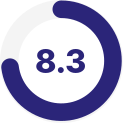
See what the experts have to say about performance of stocks and funds you are looking at.
Read more about Expert Ratings -
Simulated trading

Practice investing and build your confidence without using real money.
Read more about Simulated Trading
-
News

AI-powered news summaries provided by Pebble based on your portfolio, watchlist, or top-moving stocks.
Read more about News summaries -
Categories

Browse stocks and funds across a variety of themes and categories that may interest you.
Read more about Categories -
Recurring investments

Streamline your financial decision-making and give your money potential to grow with recurring investments.
Read more about Recurring investments

Pebble Finance, Inc (“Pebble”) is not affiliated with Digital Brokerage Services LLC (“DBS”). Pebble is a third-party service provider that uses generative artificial intelligence ("GAI") to summarize financial news from MT Newswires. GAI output should not be taken as infallible and may contain errors and content that is potentially misleading or biased.
Let’s get started
-
Download the Plynk app
Download the Plynk app in the Apple App Store or Google Play.
-
Open an account
Open a brokerage account through the Plynk app, link your bank account.
-
Discover investments
Invest in stocks and funds. Browse a variety of categories and find what interests you.